- Call Us: +918802369836
- Email us: info@getwhoisdb.com
WHOIS Database Cleaner Pro Software
Professional Tool to Clean, Filter, and Process WHOIS Database Files
Professional WHOIS Data Cleaning Software for Marketers & Researchers
GetWhoisDB Database Cleaner Pro is the ultimate solution for processing WHOIS database files. Our professional whois data cleaner software helps you remove duplicates, filter invalid emails, and prepare clean data for your marketing campaigns. Learn how to clean whois database effectively with our step-by-step guide.
One-time purchase: $20 USD (INR 1800/-) - Lifetime license with free updates.
GetWhoisDB Database Cleaner Pro - Professional WHOIS Database Cleaning Software
Why choose our whois database cleaner? Clean thousands of records in seconds, remove duplicate emails and phone numbers, filter emails by patterns, and export in multiple formats. Perfect solution for marketers, researchers, and data analysts who need to clean whois database files efficiently.
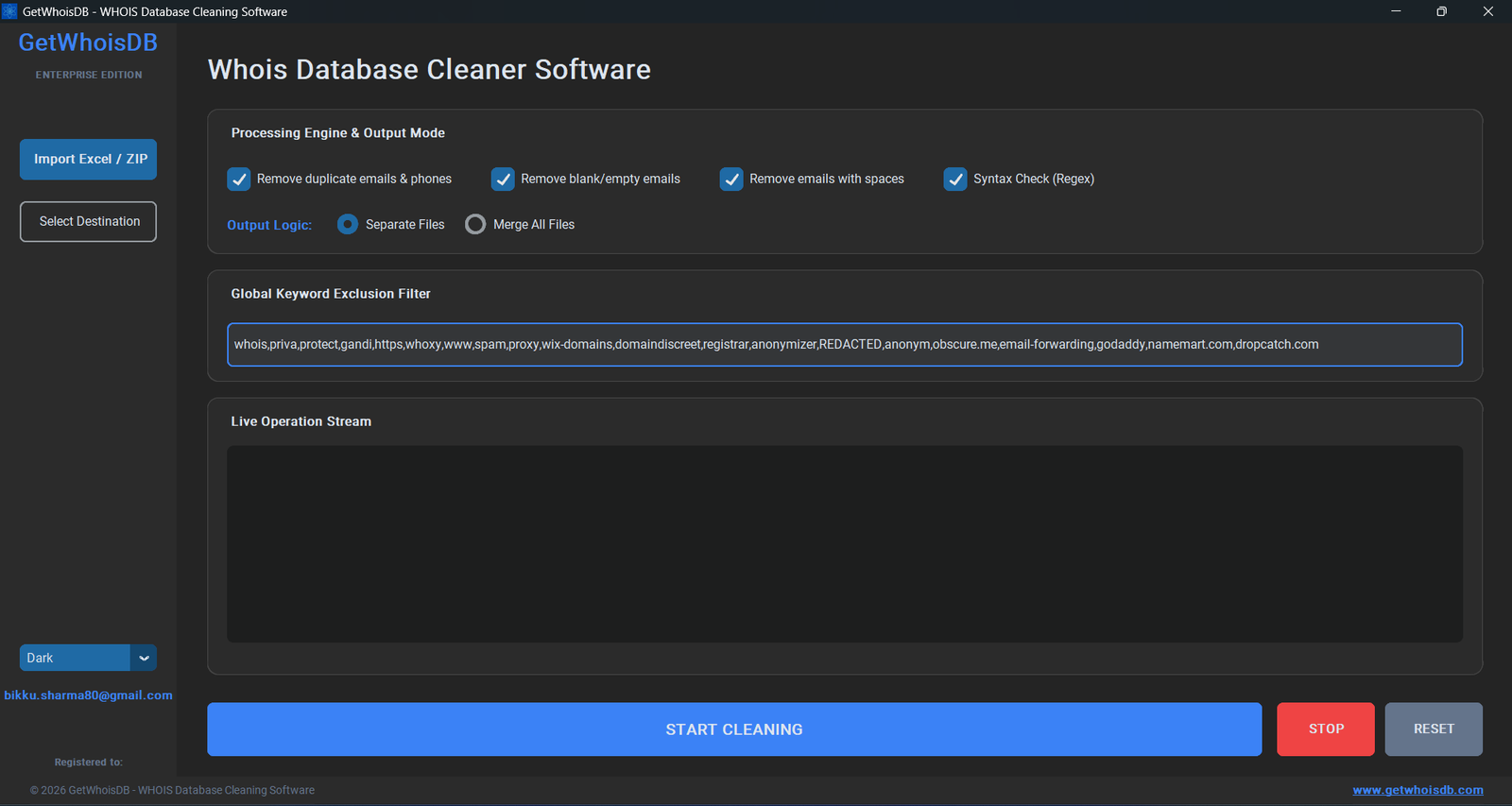
Professional Interface - Easy to Use WHOIS Data Cleaner Software
WHOIS Database Cleaner Pro
One-Time Purchase
(INR 1800/-)
- Lifetime License - No subscription fees
- Process Excel & ZIP files
- Remove duplicate emails & phones
- Filter emails by patterns
- Clean invalid data automatically
- Export to Excel & CSV formats
- Free lifetime updates
- Priority technical support
- Commercial use allowed
Purchase & Download
Complete the payment process to get instant access to download the WHOIS database cleaner software. You'll receive the download link immediately after payment.
Credit/Debit Card
Secure payment via Razorpay
PayPal
International payments
Learn How to Clean WHOIS Database in 5 Easy Steps
Follow these simple steps to clean your WHOIS database files using our whois data cleaner software:
Download Software
After purchase, download the executable file
Get Your Copy of WHOIS Database Cleaner
Once your payment is confirmed, you'll receive download instructions. The software comes as a single .exe file - no installation needed!
Run Software
Double-click the executable file to launch
Launch the Application
Simply double-click on the GetWhoisDB_Cleaner_Pro.exe file. The software will open immediately with a clean, professional interface ready for use.
Select Input File
Choose your WHOIS database file (Excel or ZIP)
Choose Your Database File
Click the "Browse" button next to the input field and select your WHOIS database file.
Excel Files
- .xlsx format
- .xls format
- Single file processing
ZIP Archives
- Batch processing
- Multiple Excel files
- Save time on large datasets
Configure & Start
Set options and click "Start Cleaning"
Configure Cleaning Options
Customize how you want to clean your WHOIS database:
Processing Time
- Small files (under 50,000 records): 2-3 minutes
- Medium files (50,000-200,000 records): 5-8 minutes
- Large files (200,000+ records): 10-15 minutes
- ZIP archives with multiple files: Time depends on total records
The software will show real-time progress and estimated time remaining
Wait & Download
Let the software process and get cleaned file
Processing and Results
Once you click "Start Cleaning", the software will:
Reading & Analyzing
Loading your WHOIS database file
Applying Filters
Removing duplicates and invalid entries
Generating Output
Creating cleaned file with timestamp
Ready to Download
Your cleaned database is ready!
Output File Format
The cleaned file is automatically saved with timestamp:
originalname_cleaned_YYYYMMDD_HHMMSS.xlsx
.xlsx - Recommended
.csv - Universal format
Benefits of Using Professional WHOIS Database Cleaning Software
Save Time & Money
- Process 100K records in 60 seconds
- No manual data cleaning needed
- Reduce bounce rates significantly
- One-time payment, lifetime use
Improve Campaign Results
- Clean data = Better deliverability
- Higher open and click rates
- Reduce spam complaints
- Professional data for campaigns
Data Privacy & Security
- 100% offline processing
- No data sent to servers
- Your data remains private
- No internet required
Who Needs WHOIS Database Cleaning Software?
Email Marketers
Clean email lists for better campaign performance and higher deliverability rates.
WHOIS Researchers
Process and analyze large WHOIS datasets for research and trend analysis.
Data Analysts
Prepare clean datasets for analysis, reporting, and business intelligence.
Affiliate Marketers
Clean prospect lists for affiliate offers and partnership opportunities.
Common Questions About WHOIS Database Cleaner Software
Ready to Clean Your WHOIS Database?
Join thousands of marketers and researchers who use our professional whois database cleaner software. Clean data = Better results!
One-Time Payment
$20 USD
(INR 1800/-)
Lifetime license with free updatesSecure Payment | Priority Support
Need WHOIS Database Files to Clean?
Get fresh, daily-updated WHOIS database files from GetWhoisDB. Millions of newly registered domains with complete contact information.
View WHOIS Database Plans